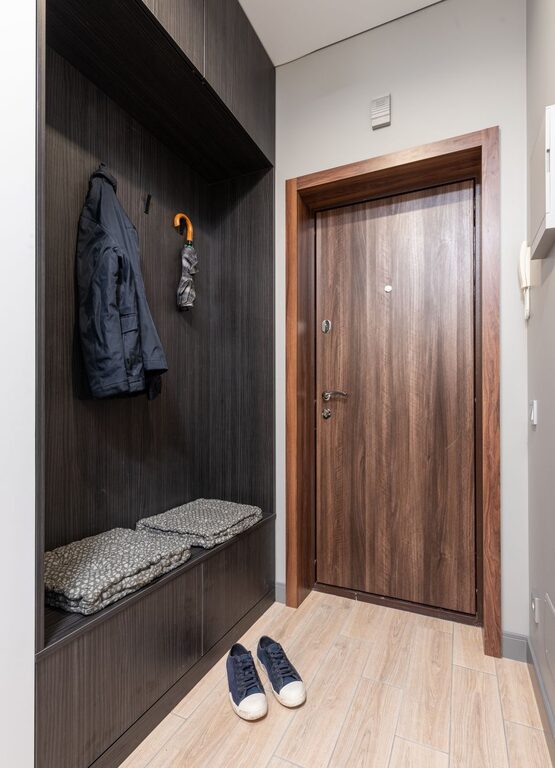











A family command center is a dedicated spot where everyone can check schedules, manage reminders, store important papers, and keep everyday items organized. It does not need to be large, expensive, or perfectly styled. The best command center is one that fits your home and makes family routines easier.
With a few practical tools and a clear system, you can create a central hub that helps everyone know what is happening and where important items belong.
What Is a Family Command Center?
A family command center is a shared organization station for household information and daily essentials. It may include a calendar, message board, mail organizer, key hooks, shopping list, or space for school papers.
The goal is to bring frequently used information and items together. Instead of searching through countertops, backpacks, phones, and drawers, family members have one dependable place to look.
A command center can be placed in many areas, including:
– An entryway
– A kitchen wall
– A mudroom
– A hallway
– A home office corner
– The side of a refrigerator
– A small section of a pantry
Choose a location that is easy for everyone to see and reach. A beautiful system will not be useful if it is hidden away or difficult to access.
Choose the Right Location
Start by observing how your family moves through the home. Where do people enter, drop bags, sort mail, and check schedules? The answers will help you find the most practical location.
An entryway works well for keys, bags, shoes, and outgoing items. A kitchen may be better for meal planning, calendars, and household notes. If children need to use the command center, place the most important items at a comfortable height.
Before installing anything, consider:
– Available wall and counter space
– Lighting
– Distance from the main entrance
– Access to electrical outlets
– Whether children can reach their items
– How the area will look when fully in use
You may not need an entire wall. A narrow strip of wall, a cabinet door, or a small shelf can provide enough space for a useful system.
Decide What Your Family Needs
Avoid adding supplies simply because they look attractive in organizing photos. Instead, list the problems you want the command center to solve.
For example, your family may need help with:
– Forgetting appointments
– Misplacing keys
– Managing school papers
– Remembering weekly chores
– Tracking activities
– Sorting incoming mail
– Planning meals
– Preparing items for the next day
Select tools that address your actual routines. If your family already uses a digital calendar, you may only need a printed weekly overview for quick reference. If paper tends to pile up, a simple file system may be more helpful than another bulletin board.
Essential Components to Consider
Every family command center will look different, but several components are especially useful.
A Shared Calendar
A calendar provides a quick view of appointments, activities, school events, work schedules, and important deadlines. Use a format that everyone can understand at a glance.
You can choose a:
– Monthly wall calendar
– Weekly dry-erase calendar
– Magnetic refrigerator calendar
– Printed schedule
– Digital display
Assign a color to each family member if that makes the schedule easier to read. Keep the calendar current by choosing one person to update it regularly or setting a weekly family check-in.
A Mail and Paper Station
Paper can quickly create clutter, so give it a clear path. Use labeled folders, wall pockets, or a small desktop file holder.
Helpful labels may include:
– To Do
– To File
– School
– Receipts
– Outgoing
– Important
Try to handle papers when they enter the home. Recycle junk mail, file documents that need to be kept, and place action items in the appropriate folder. Set a regular time to review the files so they do not become storage for forgotten tasks.
Hooks and Drop Zones
Hooks make it easier to keep keys, bags, coats, and reusable shopping bags off the floor. Give each family member a specific hook or basket when possible.
A labeled drop zone can also help children learn where their belongings go. Keep everyday items within reach, but store delicate or private items somewhere else.
A Message Board
A message board can hold reminders, permission forms, invitations, and short notes. Choose one type of board rather than combining several systems that may compete for attention.
A whiteboard is useful for temporary information, while a corkboard works well for papers and visual reminders. Review the board often and remove anything that is outdated.
Lists and Planning Tools
A shopping list, meal plan, chore chart, or weekly priorities list can make daily decisions easier. Keep these tools simple and visible.
If your family shares a digital list, you may not need a paper version. However, a written list can be convenient for children and guests who do not use the same apps.
Build a System for Incoming Items
A command center works best when it manages movement, not just storage. Decide what should happen when an item enters the house.
For mail, the process might be:
- Sort mail near the command center.
- Recycle unwanted items immediately.
- Place bills or forms in a To Do folder.
- File documents that need to be saved.
- Put outgoing mail in a designated spot.
For school papers, create a similar process. Each child might have an inbox for papers that need attention and a separate folder for items worth keeping. At the end of the school year, review the folders and keep only the most meaningful or necessary documents.
Add Labels and Simple Instructions
Labels help everyone follow the system, especially children and visitors. Use clear words such as “Keys,” “To Sign,” “Library Books,” or “Return.”
If a process has multiple steps, add a short instruction card. For example, a morning checklist might include:
– Check the calendar
– Pack the backpack
– Take the lunch bag
– Return library books
– Check the weather
Keep instructions positive and easy to read. The purpose is to reduce mental effort, not create another complicated task.
Keep the Design Practical
A command center should support your routines while fitting the style of your home. Use matching containers or frames if you enjoy a coordinated look, but function should come first.
Consider using:
– A narrow shelf for small baskets
– Matching hooks for bags and keys
– A magnetic board for flexible storage
– Clear folders for visible papers
– A tray for items that need to leave the house
– A small bin for chargers or shared supplies
Avoid filling every available space. Open areas make it easier to see important information and leave room for changes.
Create a Maintenance Routine
Even the best system will become cluttered without regular maintenance. Set aside five to ten minutes once or twice a week to reset the command center.
During the reset, you can:
– Remove expired reminders
– Update the calendar
– Empty the mail folders
– Return misplaced items
– Refill supplies
– Review upcoming events
– Wipe down surfaces
A monthly review is also useful. Ask whether each part of the command center is still helping. Remove tools that no one uses and adjust the layout when family routines change.
Start Small and Improve Over Time
You do not need to complete the entire project in one weekend. Start with the most urgent need, such as a shared calendar or a place for keys. Use the system for a week or two, then note what is missing or causing confusion.
A successful family command center is flexible. It should grow and change as children get older, schedules shift, and household needs evolve. Keep the setup visible, simple, and easy for everyone to use. With consistent habits and regular updates, a small organization station can make daily life feel calmer and more manageable.