









Keeping cables and chargers organized can make a room feel cleaner and help you find what you need quickly. A simple system can prevent tangled cords, reduce clutter, and protect your charging accessories from unnecessary wear.
You do not need expensive equipment or a large storage area. With a few basic supplies and a practical routine, you can create an organization system that works for your home, office, or travel bag.
Start With a Cable Cleanup
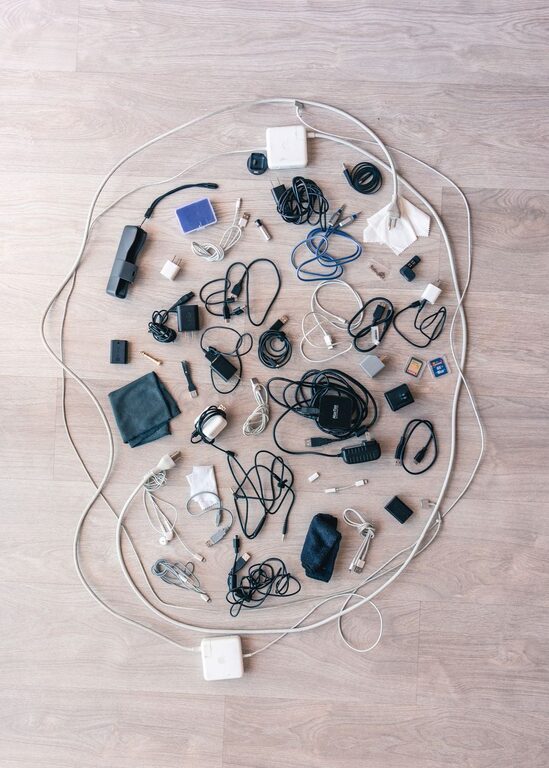
Before buying storage products, gather every cable, charger, adapter, and power strip in one place. Look in desk drawers, nightstands, bags, closets, and storage boxes. Seeing everything at once makes it easier to understand what you have.
Create three groups:
– Cables and chargers you use regularly
– Items you use occasionally
– Items that are damaged, outdated, or no longer needed
Check each item for fraying, exposed wires, loose connectors, bent plugs, or signs of heat damage. Damaged charging accessories should not be used. Set them aside for proper electronic waste recycling according to your local guidelines.
If you find several cables that serve the same purpose, keep the best-condition examples and consider recycling extras. Avoid throwing electronic accessories in a regular recycling bin unless your local program allows it.
Sort Cables by Purpose
Once you have removed unwanted items, organize the remaining cables by what they do. Common groups include:
– Phone and tablet charging cables
– Computer and monitor cables
– Audio and video cables
– Camera and gaming cables
– Power cords and adapters
– Travel chargers and portable batteries
Sorting by purpose is more useful than sorting only by cable length. When you need a phone charger, you can go directly to the phone and tablet section instead of searching through every cord.
You can also create a small “daily use” group for the cables that stay connected to your main devices. Store less frequently used cables separately so they do not crowd your primary workspace.
Use Labels to Identify Cables
Many cables look almost identical, especially when they have the same color and connector. Small labels can save time and prevent unnecessary unplugging.
Label each cable near one end with a short description, such as:
– Desk monitor
– Bedroom lamp
– Tablet charger
– Camera cable
– External drive
– Travel adapter
You can use adhesive labels, writable cable markers, masking tape, or small tags. Choose labels that are easy to read and secure enough to stay in place.
For cables that are connected behind furniture, label both ends. This is especially helpful for computer equipment, entertainment systems, and power strips. If you need to move or replace one device later, you will know which cable belongs to it.
Prevent Cables From Tangling
The best way to prevent tangles is to give each cable its own shape and storage space. Avoid tossing loose cords into a deep drawer or box.
Useful options include:
– Hook-and-loop cable ties
– Silicone cable clips
– Reusable twist ties
– Small zip pouches
– Cable sleeves
– Elastic bands designed for cord storage
Wrap cables loosely rather than tightly. A wide loop is gentler than a small, firm coil and helps reduce stress near the connector. Secure the cable in the middle or around the outer portion, not directly over the plug.
Avoid wrapping a cable tightly around a charger block. Instead, separate the cord from the adapter when possible and store them together in a pouch or compartment.
Create a Dedicated Charging Station
A charging station gives frequently used devices and cables a permanent home. It can be placed on a desk, shelf, kitchen counter, or nightstand.
Start with a power strip or charging hub placed where it will not be stepped on or covered. Use cable clips or adhesive holders to guide each cable toward its usual device. Leave enough slack to pick up a phone or tablet without pulling on the connector.
You can improve the station by adding:
– A small tray for phones and earbuds
– A box with openings for charging cables
– Labels for each charging position
– A cable sleeve to group cords together
– A stand that keeps devices upright
Keep the station easy to reach. If it is hidden behind furniture or filled with unrelated items, it may become difficult to maintain.
Organize a Desk Setup
A desk often collects the most cables, including monitor cords, keyboard cables, charging leads, and power adapters. Start by deciding which devices need to stay connected all the time.
Guide the cables along the back or underside of the desk using clips, trays, or a cable management basket. Keep cords away from areas where your legs or chair can catch them.
A few simple improvements can make a noticeable difference:
– Use a cable tray under the desk for power strips
– Group cables that travel in the same direction
– Leave extra length in a loose loop under the desk
– Keep chargers off the floor when possible
– Label cords before moving equipment
Do not force too many cables into one sleeve or clip. A crowded system is harder to adjust and may place pressure on the cords.
Store Extra Cables in Containers
For cables that are not used daily, choose containers that keep them visible and separated. Small bins, drawer dividers, clear pouches, and labeled boxes all work well.
Consider using one container for each category, such as:
– Phone and tablet cables
– Computer accessories
– Audio and video cables
– Travel items
– Spare adapters
Clear containers make it easier to see what is inside. If you prefer opaque boxes, add a large label to the front. Store the most frequently used categories at the front of a drawer or on an easy-to-reach shelf.
Avoid placing heavy items on top of cable boxes. Excess weight can bend connectors and make cords difficult to remove.
Manage Chargers While Traveling
A travel cable kit prevents loose cords from spreading through a suitcase or backpack. Use a small organizer pouch with separate compartments for cables, adapters, earbuds, and portable batteries.
Pack only the accessories you expect to use. Before leaving, check that each cable matches the devices you are bringing. This helps reduce unnecessary weight and prevents you from carrying several identical cords.
Coil each cable loosely and secure it with a reusable tie. Keep small adapters in a separate pocket so they do not scratch other items or pull on the cable ends.
A simple travel kit can include:
– One main phone or tablet cable
– A compatible wall charger
– A spare cable
– A compact power strip, if needed
– Earbuds or headphones
– A small cable tie set
Build a Simple Maintenance Routine
Cable organization works best when it becomes part of your regular routine. Once a month, spend a few minutes returning cables to their proper locations and removing items you no longer use.
When buying a new device, decide where its cable will be stored before opening the package. If you replace a charger or cord, recycle the old one if it is no longer useful.
Also review your labels from time to time. Update them when devices move or when a cable is reassigned. A tidy system should be easy to adjust as your needs change.
Final Tips for a Tidy Cable System
A good cable organization system should be simple, visible, and easy to maintain. Focus on the areas that create the most clutter first, such as your desk, charging station, or travel bag.
Remember these basic principles:
– Keep only the cables you need
– Sort items by purpose
– Label similar-looking cords
– Store cables loosely
– Give daily-use items a permanent home
– Keep damaged accessories out of use
– Review your collection regularly
With a few labels, storage containers, and reusable ties, you can turn a messy collection of chargers and cables into an organized system that saves time and keeps your space looking neat.